











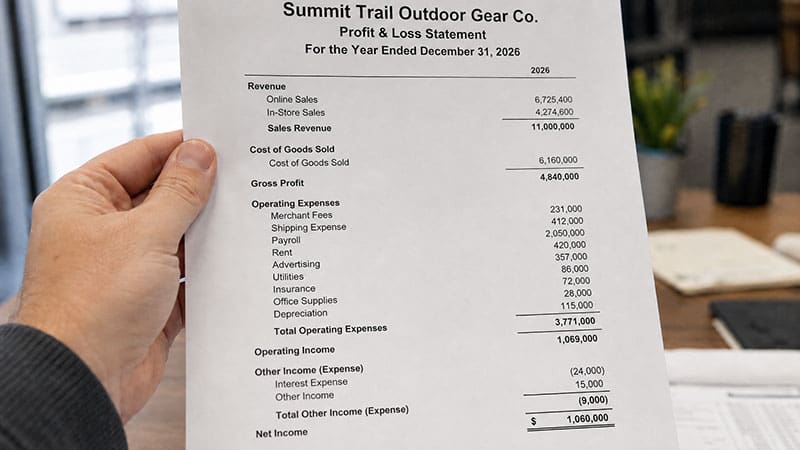



Simplify Your Financial Planning & Stay on Top of Your Cash Flow
Managing your business finances can be overwhelming, but having the right tools makes all the difference. Our free, downloadable Business Budget and Cash Flow Templates will help you take control of your finances, forecast your cash flow, and make informed financial decisions, all without relying on QuickBooks.
What’s Inside?
✅ Business Budget Template
- Plan your monthly expenses and revenue
- Track actual vs. projected performance
- Gain insights into spending trends
✅ Cash Flow Forecasting Template
- Easily track money coming in and going out
- Predict shortfalls and surpluses
- Plan ahead to avoid cash flow problems
✅ Break-Even Analysis Sheet
- Determine how much revenue you need to cover costs
- Identify profitability thresholds
- Adjust pricing and expenses for better margins
✅ Expense Tracking Spreadsheet
- Categorize and monitor all business expenses
- Identify areas to cut costs
- Keep a digital paper trail for tax season
Why Use These Templates?
- 📈 Customizable & Easy to Use – Adapt them to fit your business needs.
- 💰 Designed for Growing Businesses – No unnecessary complexity, just what you need.
- ⏳ Saves Time – Skip manual calculations with built-in formulas.
- 📊 Better Financial Clarity – Gain a real-time view of your finances without expensive software.
Who Are These Templates For?
✔️ Small Business Owners
✔️ Freelancers & Entrepreneurs
✔️ Startups & Growing Companies
✔️ Business Consultants & Accountants
Get Your Free Templates Now
Simply enter your email below to download your free Business Budget & Cash Flow Templates instantly.
How to Set Up the Business Budget and Cash Flow Templates
Start With Revenue and Expense Estimates
Open the Business Budget Template and begin by listing all projected sources of income for each month. These may include online sales, in-person sales, service contracts, subscription income, or consulting revenue. Each source should be listed in its own row for clarity.
Under the expenses section, divide anticipated costs into fixed and variable categories. Fixed expenses might include rent, insurance, and salaries. Variable expenses can include inventory, utilities, commissions, travel, and marketing spend. Input monthly estimates based on your past performance or expected operations.
Prepare Your Cash Flow Sheet for Timing Accuracy
In the Cash Flow Forecast Template, enter each inflow and outflow in the appropriate period. You’ll want to break down transactions such as customer payments, payroll runs, rent disbursement, vendor invoices, and other operational cash movement. Assign each entry to its corresponding week or month, depending on the granularity of the template.
The template automatically calculates net cash movement and running balances. Use these running balances to assess when you may face shortfalls or when you can afford to reinvest in the business.
Complete the Break-Even Analysis Section
In the Break-Even Analysis tab, fill in your average sale price per unit, variable cost per unit, and total fixed monthly costs. The sheet will then calculate the number of sales or revenue required to break even. This insight helps guide sales targets and pricing strategies.
Begin Logging Actual Expenses
Open the Expense Tracking Template and begin entering real transaction data. This log should match your receipts, credit card statements, and bookkeeping system. Categorize each expense identically to your budget categories to allow for side-by-side comparison during reviews.
Customizing the Templates for Your Specific Business Needs
Adjust Categories and Formatting
If you operate a service business, you may not need categories like “Inventory” or “COGS.” You can rename those rows to more relevant costs such as “Contract Labor” or “Licensing Fees.” Similarly, if you run an e-commerce store, you may want to break out categories like “Shipping,” “Merchant Fees,” or “Product Returns.”
If you add or remove rows, be sure the formulas for subtotals and totals still reflect the correct range of cells. Double-check that category totals flow into your monthly total row.
Incorporate Department or Product Lines
For growing businesses, breaking your budget down by department or product line can help clarify profitability. Create separate tabs for each major product line or division. Then aggregate totals in a summary sheet. Use color coding to make departmental trends easier to interpret.
Establishing a Recurring Review Schedule
Monthly Budget vs. Actual Reviews
At the end of each month, input actual income and expenses into the appropriate section. Use the built-in formulas to calculate the variance from your projected figures. Large variances should be flagged and investigated.
For example, if your advertising spend is significantly higher than expected, note whether it was due to a campaign launch, a billing mistake, or rising rates. Adjust future projections accordingly to reflect updated assumptions.
Quarterly Financial Assessments
Each quarter, evaluate how the business is tracking overall. Are revenue goals being met? Are expenses growing faster than expected? Use quarterly rollups to compare actuals to quarterly projections. This long-range view allows you to reallocate resources or modify your business plan based on year-to-date performance.
Annual Budget Adjustments
Use year-end data to revise assumptions for the next budget cycle. Update pricing models, recurring cost contracts, and hiring plans. This review process is a cornerstone of proactive business planning.
Running Forecasts and Financial Scenarios
Test Alternate Revenue Scenarios
Duplicate your spreadsheet to run different revenue projections. For instance, what happens if you add a new product? How would a 15% drop in customer demand affect your bottom line? Forecasting allows you to prepare for both growth and contraction.
You can also simulate best-case and worst-case scenarios side by side. Label each scenario clearly, and compare net profit, cash flow trends, and break-even dates.
Evaluate Loan Repayment Capacity
Use the Cash Flow Forecast to determine if your business can sustain new debt. Enter the proposed loan principal and interest payments into the forecast. Then monitor how the new expense affects your cash balances month by month. If you see negative balances in future months, consider a different financing structure or timeline.
Adjust Pricing and Cost Structure
Update the Break-Even sheet to explore price increases or cost-reduction initiatives. If your break-even quantity drops after a price increase, you may find it easier to hit profit targets with fewer sales. Conversely, if you can reduce cost per unit, you’ll improve margins while maintaining the same pricing.
Keeping Templates Accurate and Functional
Set Up Shared Access for Your Team
If you’re working with a partner, bookkeeper, or advisor, consider sharing the template in Google Sheets with comment-only or edit access. Keep one tab for notes and version tracking, and restrict editing access on formulas and reference tabs to reduce errors.
Backup and Archive Historical Versions
Save a new version of your spreadsheet at the end of each month or quarter. Label each version clearly by date. This allows you to track trends over time and analyze performance history in detail.
Align Budget Categories With Accounting Software
If you use accounting software like GlassJar, export income and expense reports in CSV format and copy/paste into your spreadsheet’s actuals columns. This keeps your templates aligned with your live bookkeeping records. It also reduces time spent entering data manually.
Document Financial Assumptions
Every budget and forecast relies on assumptions: expected revenue growth, customer payment timing, marketing ROI, rent increases, etc. Document these assumptions in a separate tab within your template. When changes occur, revise the assumptions accordingly and note the update date.
Enhancing Template Use With Additional Tools
Create Dashboards and Summary Visuals
Add charts or graphs that summarize key indicators such as revenue growth, profit margin, and expense distribution. This visual layer helps team members or investors grasp financial trends quickly. Use built-in chart functions in Excel or Google Sheets.
Automate Data Imports
Use Google Sheets integrations or Excel Power Query to pull in real-time bank or transaction data. Tools like Zapier or Sheetgo can sync financial platforms with your budget tracker. Automation saves time and reduces data entry mistakes.
Set Email or Calendar Reminders
Create recurring tasks to remind yourself to update your budget and cash flow sheets. Whether monthly or bi-weekly, consistent updates prevent surprises. If your business has partners or department heads, use shared calendars to assign review tasks.
Cash Flow Planning for Stability and Growth
Reflect True Timing of Inflows and Outflows
Don’t assume immediate payment from customers or instant withdrawal by vendors. Enter realistic payment timelines based on historical trends. For example, if invoices are paid 30 days after issue, model that delay in the forecast.
Account for Seasonal Shifts
If your business has peak seasons or dry spells, reflect that in both revenue and expense rows. Increase spending for busy months when inventory and labor needs grow. Reduce projections during slow periods.
Include One-Time and Irregular Costs
Don’t forget about annual software renewals, license fees, tax filings, or equipment purchases. These expenses don’t occur monthly but can impact cash flow significantly when due. Add them into your forecast during the applicable month.
Set a Minimum Cash Reserve Target
Decide how much you need in the bank to feel secure. Add a formula in your forecast that flags any month your projected balance drops below this minimum. That alert can signal when to cut spending or delay payments.
Scaling the Template With Your Business
Add Staffing Plans and Compensation Tracking
Include a staffing section that lists positions, start dates, monthly salary, and benefits. Use these figures to populate labor expense rows. If hiring is phased, enter different start dates for each employee.
Track Multiple Product Lines or Services
Use separate budget tabs to track different product lines, service tiers, or business locations. Consolidate these in a summary tab that shows your company-wide totals.
Estimate Taxes Based on Profit Projections
Create a row for estimated income tax liability. If you project profit above a threshold, include quarterly or annual tax payments in your forecast to avoid surprises.
Reflect Depreciation and Capital Purchases
If your business buys equipment, machinery, or vehicles, note the cash outlay in the month of purchase. Separately, add non-cash depreciation entries if you prepare financial statements using accrual accounting.